

How to Use Meta Tags for SEO the Right Way in 2026
August 5, 2026
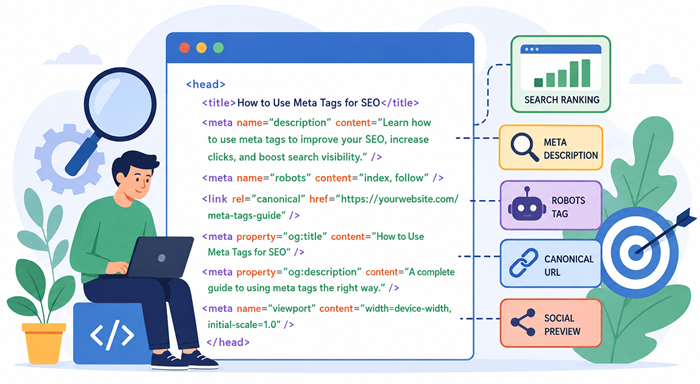
Learning meta tags can make a noticeable difference in how search engines understand your website. While great content remains the foundation of SEO, properly optimized HTML elements help search engines interpret pages more accurately and encourage users to click your listings.
Many website owners focus only on content and backlinks while overlooking the technical details that support rankings. Understanding how to use meta tags effectively improves search visibility, increases click-through rates, and creates a better experience for both users and search engines.
Whether you’re managing a business website, blog, or online store, this guide explains everything you need to know about meta tags, including which ones matter, how to optimize them, and the mistakes to avoid.
Why Meta Tags Matter for SEO
Although visitors rarely see most meta tags, search engines rely on them to understand important information about a webpage.
Properly configured meta tags help:
- Improve search engine understanding
- Increase organic click-through rates
- Prevent duplicate indexing issues
- Enhance social sharing previews
- Support overall website optimization
Think of them as behind-the-scenes instructions that tell search engines how to interpret and present your pages.
Businesses investing in professional digital marketing services often prioritize technical SEO because small improvements across hundreds of pages can generate significant long-term traffic.
What Are Meta Tags?
Simply put, meta tags are snippets of HTML code placed inside the <head> section of a webpage.
They provide information about the page without displaying visible content to visitors.
Common examples include:
- Title Tag
- Meta Description
- Robots Tag
- Canonical Tag
- Viewport Tag
- Open Graph Tags
Each serves a different purpose, but together they help search engines crawl, index, and present your pages correctly.
The Most Important Meta Tags Every Website Needs
Title Tag
The title tag remains one of the strongest on-page ranking signals.
A good title should:
- Include your primary keyword naturally
- Stay under approximately 60 characters
- Describe the page accurately
- Encourage users to click
Avoid stuffing multiple keywords into one title.
Meta Description
Although it isn’t a direct ranking factor, a compelling meta description increases click-through rates.
A quality description should:
- Stay between 150–160 characters
- Summarize the page clearly
- Include the primary keyword naturally
- Include a subtle call to action
Better descriptions often lead to more organic traffic because users understand what they’ll find before clicking.
Robots Meta Tag
The robots tag tells search engines whether they should index a page or follow its links.
Common values include:
- index
- noindex
- follow
- nofollow
Using the wrong directive can accidentally remove important pages from search results.
Canonical Tag
Duplicate content happens more often than many website owners realize.
A canonical tag identifies the preferred version of similar pages, helping consolidate ranking signals and prevent duplicate indexing.
Viewport Tag
This tag improves mobile responsiveness by ensuring pages display properly across different screen sizes.
Since mobile usability directly affects user experience, this small piece of code plays an important role.
Best Practices for Using Meta Tags
Write Unique Tags for Every Page
Every page should have its own optimized title and description.
Duplicating meta tags across multiple pages makes it harder for search engines to understand which page deserves to rank.
Keep Them Relevant
Your tags should accurately describe the page content.
Misleading titles may increase clicks initially but usually result in higher bounce rates.
Focus on User Intent
Instead of writing for search engines, write for people.
Consider what users want to know before clicking your page.
Understanding how SEO converts visibility into revenue can help businesses focus on attracting qualified visitors rather than simply increasing impressions.
Avoid Keyword Stuffing
Repeating the same keyword unnaturally makes titles and descriptions difficult to read.
Search engines have become far better at understanding context and synonyms.
Common Meta Tag Mistakes to Avoid
Many websites lose valuable traffic because of simple optimization mistakes.
Some of the most common include:
- Missing title tags
- Duplicate descriptions
- Extremely long titles
- Generic descriptions
- Blocking important pages using robots tags
- Forgetting canonical URLs
Regular SEO audits can identify these issues before they affect rankings.
Meta Tags and On-Page SEO
Effective meta tags work alongside content optimization rather than replacing it.
Your page should also include:
- Clear heading structure
- Internal linking
- Image optimization
- Fast loading speed
- Helpful content
Many businesses ask about on page seo tags, but the real goal is ensuring every optimization element supports the user experience.
Understanding on-page vs off-page SEO helps businesses balance technical improvements with authority-building efforts.
How Meta Tags Support Search Visibility
Search engines evaluate hundreds of signals before ranking a page.
While meta tags alone won’t guarantee top rankings, they help search engines understand:
- Page topic
- Search relevance
- User intent
- Content uniqueness
When combined with quality content, they become an important part of long-term SEO success.
Many business owners searching for seo tags meaning discover that these HTML elements provide essential context rather than acting as ranking shortcuts.
Meta Tags for WordPress Websites
If you’re using WordPress, adding meta tags is much easier thanks to SEO plugins.
Popular plugins automatically generate editable fields for:
- Titles
- Descriptions
- Canonical URLs
- Social media previews
- Robots settings
Many beginners search for seo tags wordpress solutions because they don’t want to manually edit HTML code.
Regardless of the platform, the optimization principles remain the same.
How Google Uses Meta Tags
Google doesn’t treat every tag equally.
Some influence indexing.
Others influence search appearance.
Some simply improve mobile compatibility or social sharing.
Website owners often search for google seo tags, expecting a secret ranking formula, but success comes from using the right tags correctly—not adding more of them.
Why SEO Fundamentals Still Matter
Modern SEO involves AI, user experience, structured data, and content quality.
However, technical basics continue to play an important role.
That’s why every business still needs the fundamentals of SEO before investing heavily in advanced strategies.
Poor Keyword Usage Can Undermine Great Meta Tags
Even perfectly written meta tags cannot compensate for weak keyword targeting.
Using irrelevant phrases, over-optimization, or poor search intent alignment reduces visibility.
If you’d like a deeper understanding of how poor keyword usage affects visibility of website, this guide explains the common mistakes businesses make.
Should You Add Every Available Meta Tag?
No.
Some website owners look for a complete list of meta tags and try to implement every one.
Most websites only need the tags that directly improve indexing, search appearance, usability, and content organization.
Quality always beats quantity.
Conclusion
Learning how to use meta tags effectively is one of the simplest ways to strengthen your website’s SEO foundation. While they won’t replace high-quality content or authoritative backlinks, they help search engines understand your pages more accurately and improve how your listings appear in search results.
By writing unique titles and descriptions, using robots and canonical tags correctly, and keeping your technical SEO clean, you’ll build a stronger foundation for sustainable organic growth.
FAQs
1. What are meta tags in SEO?
Meta tags are HTML elements that provide search engines with information about a webpage.
2. Do meta tags improve rankings?
They support SEO by improving page understanding and click-through rates.
3. Which meta tag is most important?
The title tag is generally considered the most influential for SEO.
4. Should every page have unique meta tags?
Yes, unique tags help search engines understand each page individually.
5. Can WordPress add meta tags automatically?
Yes, most SEO plugins simplify creating and managing meta tags.